52
4.9
50
May 2, 2023
Last update

An expansive bridal platform connecting brides and vendors, with features for inspiration, mood boards, and streamlined communication.


Article by
Dmitry Butler
Article by
Evgeniy Butler
Article by
Vasiliy Butler
Article by
Elena Butler
Article by
Olga Butler

Bridal platform

An expansive bridal platform connecting brides and vendors, with features for inspiration, mood boards, and streamlined communication.

USA
USA
June 2021 - Feb. 2024
Published:
May 2, 2023
Updated:
March 18, 2026
Used technologies & apps:
Yii
Yii
CSS
CSS
HTML
HTML
Figma
Figma
JavaScript
JavaScript
PHP
PHP
Stripe
Stripe
Project team
Dmitry Vasilenko
Evgeniy Klitsunov
Vasiliy Krugovykh
Elena Izotova
Olga Karimova
Bridal platform

Request / Problem

The employer approached us with a vision for a comprehensive bridal platform that would connect brides with wedding vendors, provide planning inspiration, and simplify wedding-related communications. The platform needed a visually appealing, user-friendly interface with sections for inspiration, real wedding galleries, and a vendor catalog. Key features included mood boards, vendor profiles, chat functionality, a multi-role admin panel, and search and filter tools to enhance the user experience.

Solution

Our approach divided the project into distinct phases, focusing on each platform area to meet user needs, support intuitive navigation, and streamline the interaction between brides and vendors. Here is a breakdown of the solution:

Micro-Website (Initial Landing)

The micro-website serves as the introductory layer of the platform, providing essential information about the platform and its benefits for both brides and vendors.

  • Home Page: Highlights the platform’s value, including featured vendors, trending content, and unique features, setting a welcoming tone for visitors.

A bridal magazine webpage featuring elegant images: a couple in wedding attire, bouquets, and accessories. Minimalist design with stylish typography.
Microsite hero screen

  • Work With Us: Outlines the advantages for vendors working with the platform, such as broader client reach, ease of managing inquiries, and profile visibility.
Three overlapping website pages with a wedding theme, featuring images of rings, a bride with flowers, and bouquets. Design is elegant and modern.
Work with us page
  • About Us: Provides background on the company and platform mission, including how it’s designed to benefit both brides and vendors in the wedding industry.
Alt text: Elegant "About Us" page for a bridal platform. Features a romantic photo of a couple embracing, the bride in a flowing gown. Text highlights luxury wedding focus.
About us page hero screen
  • How It Works: Explains platform features, services, and benefits, such as easy profile creation, search filters, and direct vendor communication.

A bridal platform web design layout showcases six sections with minimalist aesthetics. It includes images, text about inspiration, communication, and a map.
How it works page flow

  • Contact Us: Enables visitors to get in touch for additional information, support, or partnerships.
Website contact page for "Bridal Platform" with a black-and-white image of a couple touching foreheads. Includes fields for name, email, message, and a submit button. The tone is romantic and elegant.
Contact us page
  • Vendor Application: A form specifically for vendors interested in joining the platform, allowing them to submit their information for review.
Two overlapping web page designs. The left page features bridal vendor content with images of weddings and membership plans. The right page shows a contact form.
Vendors Early-access onboarding page
  • Submit Your Wedding: Brides can submit wedding details for possible publication on the platform, sharing their experiences and creating content for future users.


Five white form templates on a light gray background. They include sections for submission details, vendor credits, wedding day info, images, and a thank you note, conveying a clean and professional tone.
Early-access wedding submission flow

Main Portal (Version 1.0)

The main portal is the core of the platform, housing primary functionalities that allow brides and vendors to interact and navigate through a variety of content.

Website homepage for "Bridal Platform," featuring three wedding articles with images. Elegant and modern design with a soft peach background.
Main portal homepage

  • Home Page: Showcases a curated feed with the latest wedding content, real weddings, and featured vendors.
Three mobile screens display a bridal magazine interface. The first shows a wedding photo, the second a search section, and the third offers vendor options. The design is elegant, in white and peach tones.
Mobile version
Webpage mockup featuring a bridal platform design. Includes elegant typography, romantic couple photos, links to wedding services, and social media prompts.
Main portal homepage sections
A website layout featuring a wedding-themed design. The left side showcases a featured wedding with a small photo and news articles. The right side has a brown background with navigation links like "How It Works" and "Contact Us." The overall tone is elegant and inviting.
Menu
  • Real Weddings: Highlights weddings selected by the platform’s editors, offering inspiration with beautifully arranged images, styles, and details.
A website homepage features "Real Weddings" with elegant photos of brides, cakes, and settings. The design is clean, with a warm, inviting color palette.
Real weddings page
  • Wedding News: Updates from the wedding industry, covering trends, tips, and seasonal styles.

Alt text: "A wedding-themed website layout displaying two pages. The left page features 'Wedding News' with articles and images on wedding trends. The right page highlights a couple embracing, titled 'Jack & Maria's Amazing Wedding in New York City,' with details and a photo below. The overall tone is elegant and modern."
Wedding news pages

  • Inspiration Galleries: A gallery featuring high-quality images sorted by color, theme, style, and season for customizable browsing.
Website design showcasing Jack and Maria's wedding in NYC. The screen displays dark and light themes with elegant photos of the couple and bride in a gown.
Wedding galleries
  • Filtering and Search: Users can filter and sort content based on several criteria:
    • Color, style, location, season, genre, event type, and setting.
    • For vendors, the filtering tool helps brides find specific types of services in their region.

Webpage design concept showing a search interface for wedding locations. Includes location filter, search results with photos, and a text search bar. Elegant and minimal.
Search flow
Search results page for "Summer time weddings" on a website. Features articles with small images and titles, set against a peach background.
Search results
  • Vendor Profiles: Each vendor profile is a detailed page showcasing the vendor’s logo, contact information, and social media links.
    • Includes a gallery of their work, a brief introductory description, and links to weddings they’ve been part of.
    • Brides can interact with vendors directly through in-platform messaging, mark profiles as favorites, and share links.

Bridal vendor webpage with a minimalist design featuring a gallery of wedding photos. A contact form overlays the page, inviting user messages.
Vendor profiles

  • Vendor Catalog: This section allows brides to browse a list of vendors, each profile providing details about services offered, location, and portfolio.
    • Brides can filter vendors by category, location, and availability, making it easy to find suitable providers for their wedding needs.
Website layout showcasing a local vendor search tool at the top with location options. Below, images display wedding scenes, creating a romantic vibe.
Vendor catalog page
Two mobile app screens on a peach background. The left screen is for finding local wedding vendors, featuring Los Angeles. The right shows a wedding team section, with a search bar, location dropdown, and an image of a couple dancing. The tone is elegant and romantic.
Mobile version
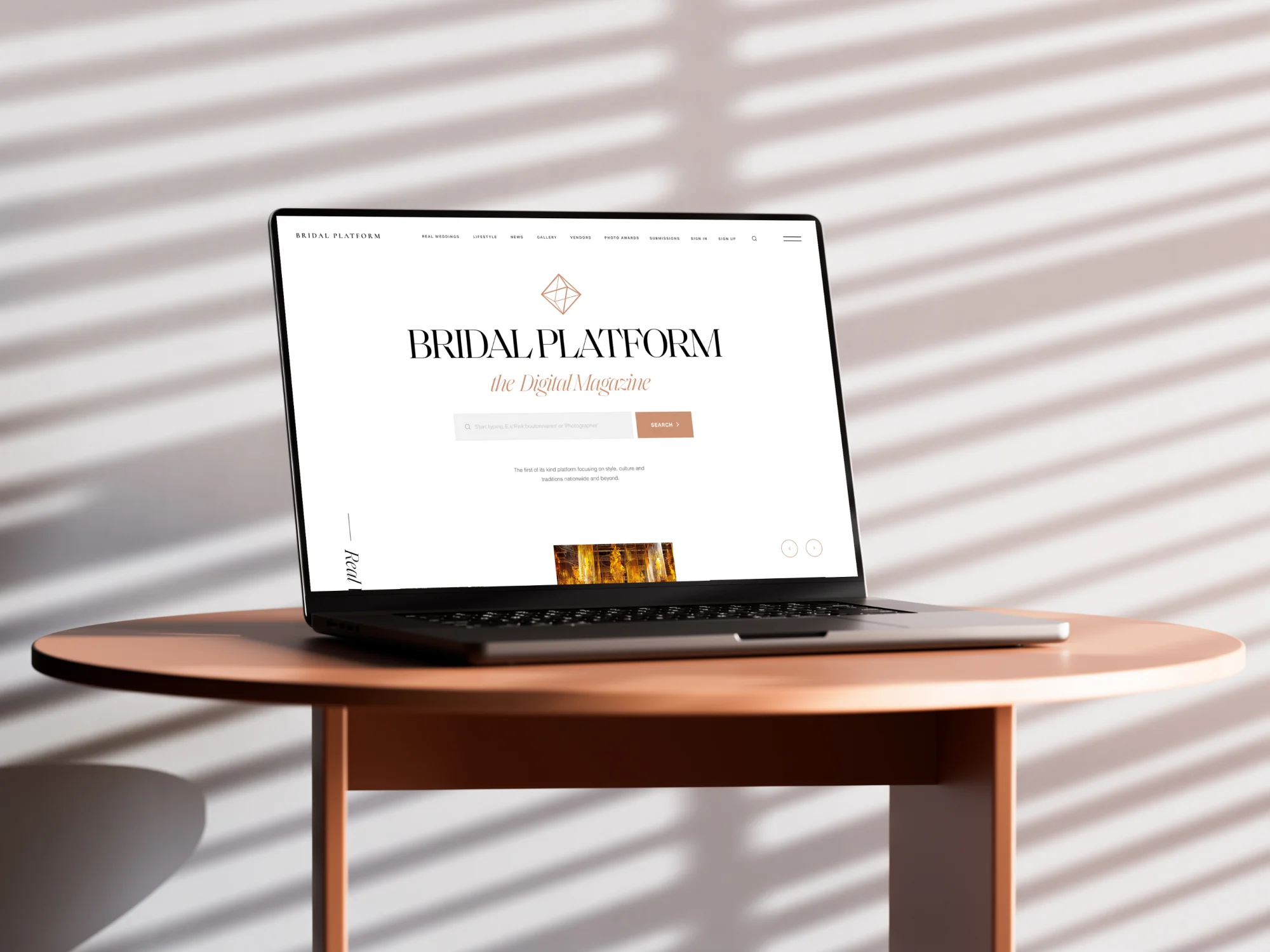
Laptop on a wooden table displaying a bridal magazine website. Soft, diagonal shadows create a calm, modern ambiance in a minimalist setting.

Personalized Panel for Brides

The Bride Panel provides brides with a dashboard to manage wedding plans, save inspiration, and communicate with vendors.

Alt text: "Minimalist registration and success message pop-ups with clean white background. The 'Register' form includes fields for email and password with a 'Sign Up' button. A 'Success message' box includes a decorative icon and a 'Got It' button in a soft brown hue, conveying a calm and elegant tone."
Profile registration
Image displaying three overlay screens with a geometric logo. First screen: verification code prompt. Second: incorrect code message. Third: success message. Tone: informative.
Email approval system

Profile and Wedding Details:

  • Brides can register and complete profiles with personal information and details about their wedding, including guest count, location, and estimated budget.
  • This information is shareable with vendors through the in-platform chat.
Two side-by-side screenshots of a wedding planning website interface display wedding details and location forms. A calendar pop-up shows March 2021.
Wedding details
User interface design for a bridal platform showing personal info sections. It features input fields for name, contact info, and wedding details with a sleek, minimalist layout and earthy tones.
Bride profile setup

Mood Board (Favorites):

  • Brides can create folders within the Favorites section, serving as mood boards to organize inspiration materials.

A minimalist website design split into two panels. The left panel showcases photography grid tiles labeled "Favorites," featuring images of fashion items like dresses and shoes. The right panel lists dresses, displaying a clean, professional look with a light color scheme and elegant typography.
Favorites folders
Three minimalist UI screens feature wedding planning options. "Create New Folder" on the left, "Your Wedding Moodboard" on the right and center. Soft tones convey elegance.
Add to favorites pop-up
  • Each folder can include articles, images, vendors, and other content from the platform. Brides can customize folders with icons and notes, and share these with friends or family via public or private links.

Two webpage layouts display "Dresses" content. One focuses on a text list, while the other showcases dress images. Clean, elegant design with a bridal theme.
Favorites sharing pages

  • Mood boards can be viewed in list or grid formats for easy browsing.
Two web pages with a minimalist design are displayed side by side. Each page features a black sidebar and a main section showcasing dresses. The left page lists text entries, while the right displays images of dresses, suggesting an elegant and modern aesthetic.
List / grid view for Favorites folder

Account Settings:

  • Brides can manage email preferences, change passwords, or delete accounts if necessary.
Minimalist account settings interface with email, password sections, and account deletion options. Black sidebar with navigation links; calm, neat tone.
Account settings

Chat and Booking System:

  • Direct messaging allows brides to communicate with vendors and share their wedding information, accessible with one click from the chat.

Three overlapping webpage mockups on a gray background, featuring a messaging interface with a black sidebar, user avatars, and message threads in a clean, minimalist design.
Chat system with vendors

  • The chat system allows brides to flag and save conversations, archive old messages, and even make vendor bookings directly from the chat.
  • Includes advanced search features, enabling brides to quickly retrieve past messages or favorites.

A laptop is propped against a light-colored wall, displaying a message application on the screen. The setting is bright and minimalistic, conveying modernity.

Personalized Panel for Vendors

The Vendor Panel provides vendors with tools to manage their profiles, submit work for publication, and interact with brides.

Three minimalist black screens on a gray background show: Log In, Recover Password, and Success messages with pink buttons and white text.
Vendor panel login pop ups
Three white notification windows with a geometric icon. Messages read: "Membership upgrade denied," "Get verified," and "Verified." Buttons labeled "OK" or "Get Started" with a clean, minimalist design.
Vendor verification pop ups

Profile Management:

  • Vendors can create profiles with detailed business information, including location, services offered, and years in business.
  • Vendors can link past weddings to their profiles, showcasing their participation in real events.

Bridal platform
Vendor profile management
Two overlapping web forms on a gray background. The left form titled "Media Info" shows fields for phone, email, and social links. The right form titled "Business Info" includes sections for uploading a logo and product photo, with fields for phone and address details. Dark vertical sidebar with navigation links is between the forms, giving a professional tone.
Business info
  • Profiles include photo galleries, logos, and links to social media. Vendors can drag-and-drop to rearrange images, and include both photos and videos (YouTube/Vimeo).
Three overlapping website mockup screens on a light gray background. They feature black and white layouts with sidebar menus, depicting sections titled "Featured In," "Gallery," and "Profile Data," conveying a clean and professional design.
Profile gallery management
A user interface mockup displays a photo editing tool with options to upload images, crop, and add colors. Includes input fields for headings and descriptions.
Profile gallery. Photo management

Preferred Locations:

  • Vendors can specify service locations using predefined regions, enhancing brides’ search experiences.
Minimalist business dashboard interface with two sections for "Business Info" and "Preferred Locations." Features input forms and menu on a dark sidebar.
Preferred locations setup

Membership and Plans:

  • The Membership section allows vendors to view available membership plans or request custom plans based on specific needs.

Webpage showing "Membership Plans" for a bridal platform. Three plans—Elevated, Premium, Elite—are detailed with features. Sidebar navigation is visible.
Membership plans
Alt text: "Webpage displaying membership plans with a dark sidebar menu on the left and a black checkout panel on the right. Pricing options and payment details are shown, with a focus on user interface design."
Checkout

Submissions:

  • Vendors can submit weddings they’ve participated in for review and potential publication, filling out forms that detail the event and credit relevant collaborators.
A website interface for wedding submissions shows a list of entries with couple names, locations, and dates. A popup message thanks users for sharing love.
Content submission
  • Submission status is visible within their dashboard, where vendors can track, edit, or withdraw entries as needed.
Alt text: A minimalist website submission form titled "Submission" with fields for personal and couple details. A popup says "Thank you for sharing your love!"
Submission flow

Support and Notifications:

  • A support section allows vendors to submit questions or issues directly to the platform’s admin team.
Alt text: "Gray screen displaying an error message stating 'Oops! Something went wrong' alongside a temporary account deactivation notice. A smaller pop-up window shows 'Membership upgrade denied' with options to cancel or contact support."
Support section
  • Vendors can manage notification preferences and review all transaction records in the payment section.

Alt text: "A webpage titled 'Payments' with a sidebar menu. It displays balance info, active card details, and fields to add a new card, including card number and address."
Payments section
A "Add Payment Method" form with fields for card details and address. A smaller overlay shows "Success!" with a checkmark, indicating completion.
Add payment method

Message Center:

  • Like the Bride Panel, vendors have access to a messaging system, enabling direct communication with potential clients.

Alt text: UI design of a bridal platform's messaging section. Includes a left sidebar menu and a conversation layout. Clean, minimalist aesthetic.
Message center

Badges and Awards:

  • Vendors can earn badges based on activity and achievements, adding credibility to their profiles and drawing attention to their expertise.

Advertising Options:

  • Vendors can apply to feature ads on the platform, enhancing visibility among brides browsing for services.

Administration Panel

The admin panel is the operational hub, providing tools for managing users, content, and platform features. Admins can access multiple sections depending on their role.

A sleek laptop displaying a vendor management board screen floats on rippling water. Neutral tones convey a modern, serene, and productive atmosphere.
Vendors management board

Page Management:

  1. The Pages section enables admins to update website content dynamically, adjust metadata, and edit content directly in live mode.
Three overlapping website dashboard screens showing tools like a live page editor and SEO meta data. The design is minimalist with black and white tones.
Main site pages CMS

Submissions and Requests:

  • Admins review vendor membership and event submission requests here, with tools for approving, rejecting, or editing content.
Bridal platform
Wedding submissions

Settings and Dynamic Elements:

  • Admins manage filter options (such as color tags for images and location categories), update menu items, and adjust platform-wide configurations.

Grid of six minimalist web interfaces, each with a black sidebar and white content area. Pages titled: Color, Membership Form, Location, Menu, Tags, Highlights.
Dynamic items management

User Management:

  • User management includes access control for admins, vendor managers, and blog editors, each with specific permissions for platform tasks.
A user interface screen titled "Users" displays a list of names, emails, and roles. A sidebar on the left shows navigation options in a minimalist style.
Users management

Vendor Management:

  • Vendor managers oversee vendor profiles, tracking updates and ensuring compliance with platform standards. Alerts are triggered when vendors make changes requiring admin review.

A clean, modern vendor management board interface is displayed. It includes a sidebar menu, filter options, and a table with various data points like company names and owners. A popup shows personal data details. The tone is professional and organized.
Vendors management board

Content Scheduling:

  • Admins can schedule posts, setting publication times for weddings and blog posts to support a consistent content calendar.
Three side-by-side screenshots of an admin panel display a calendar, blog posts, and wedding details. A sleek, minimalist design with a sidebar menu.
Blog content management

Wedding Management:

  • The Wedding section displays all published weddings, allowing admins to update, remove, or edit individual events.
  • RichText editors enable HTML formatting for event descriptions, and administrators can create visually rich posts with galleries, videos, and more.

Alt text: "Web page titled 'Publish A Wedding', featuring sections for wedding details, colors, highlights, and vendor types. The interface is minimalistic, with a sidebar menu on the left and editable fields in the center, conveying a clean and organized design."
Wedding content management

Blog Management:

  • This section mirrors the Wedding Management tools, enabling admins to approve and publish articles covering wedding trends, tips, and expert advice.
Two admin panel screens on a gray background show a wedding management interface, featuring a list on the left and wedding details on the right.
Blog management

Email Notifications:

  • The platform supports automated notifications for key actions (e.g., new registrations, submissions, booking confirmations), enhancing user engagement and ensuring smooth interactions.
Alt text: Three mobile device screens display email templates from "Bridal Platform," featuring a minimal design with black text and a geometric diamond logo on a white background. The emails include personalized greetings, account notifications, and action prompts, conveying a formal and professional tone.
Notification emails

Analytics and Monitoring:

  • Tracking tools provide insights into user behavior, helping admins make data-driven decisions about content, vendor visibility, and marketing.

This multi-faceted solution ensures that brides have a seamless, organized experience while planning their wedding, and vendors can effectively promote their services, increasing visibility and engagement. With a pre-launch strategy underway, the platform is poised to connect brides and vendors efficiently, offering a sophisticated, all-in-one wedding planning resource.

Technology

We used a blend of technologies to bring this platform to life:

  • UX/UI Design: Figma was chosen for detailed user experience and interface design, ensuring seamless navigation for brides, vendors, and administrators.
  • Frontend: Developed using React, HTML, CSS, and JavaScript to deliver responsive, engaging interactions and a smooth user experience across devices.
  • Backend: Built on Yii2 with PHP, providing a robust backend structure to support various platform roles, dynamic filtering, and interactive elements.

The platform is now in pre-launch, focusing on content, marketing strategies, and budget planning to prepare for its upcoming market release.

Awards

No items found.

About Digital Butlers

We’re Digital Butlers — a design-led team of 27 senior specialists building digital products since 2016. By choosing us, you’re getting results that are way different from what you already have — with the same commitment to your goals that Alfred has for Batman.

If you need a website, web service, or mobile app that pays off, reach out to us — we do it well.

Digital Butlers — a mature team with mature processes that deliver consistent results.

No items found.
Alex Kirilenko

Let's discuss your project.

My name is Alex and I am your potential Digital Butler

Error message
Error email
Max file size 10MB.
Uploading...
fileuploaded.jpg
Upload failed. Max size for files is 10 MB.
Thank you! Your submission has been received!
Oops! Something went wrong while submitting the form.
Clear. Memorable. Scalable

More projects to explore