


ArtFluence
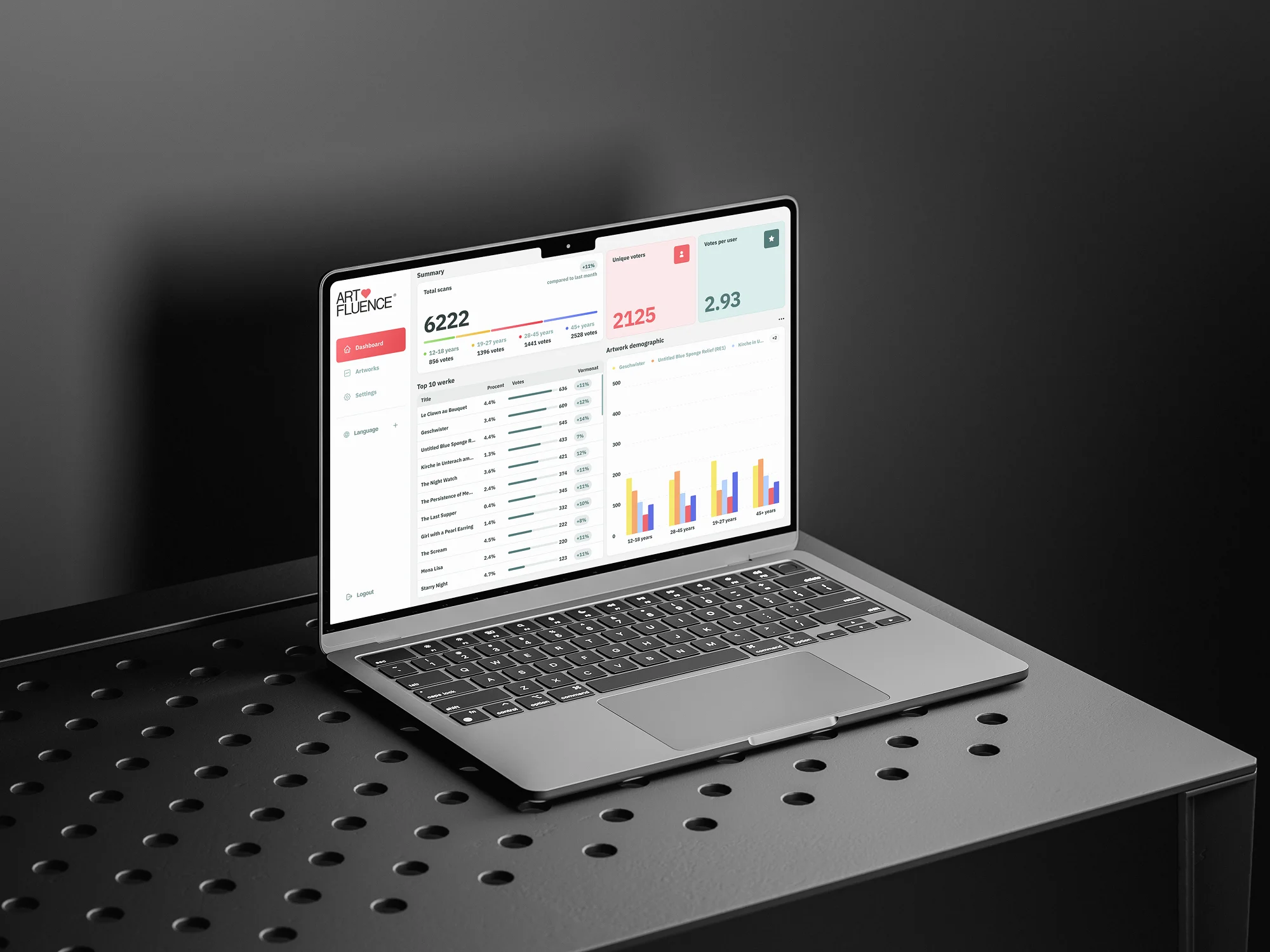
Web app enabling museums to collect votes for artworks via QR codes, manage data through a custom CMS, and display real-time voting statistics both online and on museum screens.





Request
The employer requested the development of a web application for museums to collect votes for artworks and analyze the resulting data. Voting was to be facilitated via QR codes assigned to each artwork, while gathering user information such as gender, age, city of residence, and email.
The application needed to support both anonymous voting and registration-based voting, allowing users to update their personal data, view past votes, and save exhibits to their favorites.

Additionally, a user-friendly CMS for museum admins was required to manage and edit various data fields, including object type, materials & techniques, tags, colors, museum information, creation year, and exhibitions.
The system was to automatically generate QR-codes as well as mobile-optimized voting pages for each exhibit, with a custom color theme derived from the artwork’s palette (paintings, sculptures, exhibitions, etc.) Data import through XML files also needed to be supported.
Voting statistics were to be displayed both within the museum’s admin panel and on public screens in the museum. Separate CMS access was required for each museum. Lastly, the project included the design of a UI and the development of a landing page for the SaaS product.

Solution
To ensure a seamless and user-friendly experience, we began with detailed UX planning. This involved designing app logic and creating prototypes using pre-built component libraries, which we customized for the project.

We structured each section of the admin panel, covering user registration, login, password recovery, and exhibit creation/editing screens. Separate prototypes were developed for the voting, statistics, and the app promo landing page.
One of the main challenges was ensuring the correct categorization and coordination of colors used for personalizing voting pages. To address this, we provided administrators the ability to select up to five primary colors for customizing key sections and elements of each voting page. Additionally, admins could customize text color for each block to maintain a cohesive and clean interface.

We also devised a system for collecting user data without requiring registration. Users could vote anonymously, with data stored in browser cookies, allowing them to select their gender, age group, and residence. These details would be attached to the exhibit during voting. Should the user decide to register later, the previously entered data would automatically populate the registration form, streamlining the process.
Once the prototype and logic were approved, we moved on to UI design, refining the visual elements, including colors, fonts, and layouts. We developed the dashboard interface, voting and statistics pages, and the landing page for the product.

Simultaneously, we initiated backend development, laying the foundation for the application’s functionality. Frontend development followed upon approval of each section UI. The entire project was thoroughly tested, optimized, and deployed on the employer’s server. The app promo landing page was built on Webflow to provide flexibility in future updates.

Technology
- UX/UI Design: Figma
- Prototyping: UntitledUI Library
- Frontend: Webflow, React, TypeScript
- Backend: PHP, Symfony
%25201.jpeg)
Awards
About Digital Butlers
We’re Digital Butlers — a design-led team of 27 senior specialists building digital products since 2016. By choosing us, you’re getting results that are way different from what you already have — with the same commitment to your goals that Alfred has for Batman.
If you need a website, web service, or mobile app that pays off, reach out to us — we do it well.
Digital Butlers — a mature team with mature processes that deliver consistent results.


Let’s discuss your next website.
My name is Alex, and I’ll help you define the right next step.

.webp)
.webp)