Unite 2030
Unite was built around a simple but ambitious idea: helping people from around the world turn bold ideas into real change. Through in person and online programs, as well as hackathons, anyone could apply with a solution to a meaningful challenge. Whether it was finding a better way to filter polluted water, restoring green spaces in desert regions, or tackling poverty in their local community, every idea started with the same opportunity.
Within the project, these participants were known as Changemakers, and the entire experience revolved around them. Over the course of several weeks, they worked alongside mentors, industry experts, and potential investors to transform promising ideas into real projects.
The ecosystem extended beyond Changemakers. It also included investors looking to fund impactful initiatives, as well as donors. These were people whose own ideas were already making a difference but who were not yet ready to become full scale investors. Instead, they supported the project through recurring contributions.
Our employer came to us with two objectives: redesign the website to generate more leads and build an internal application management platform that would simplify workflows consuming a significant amount of the team's time and resources.
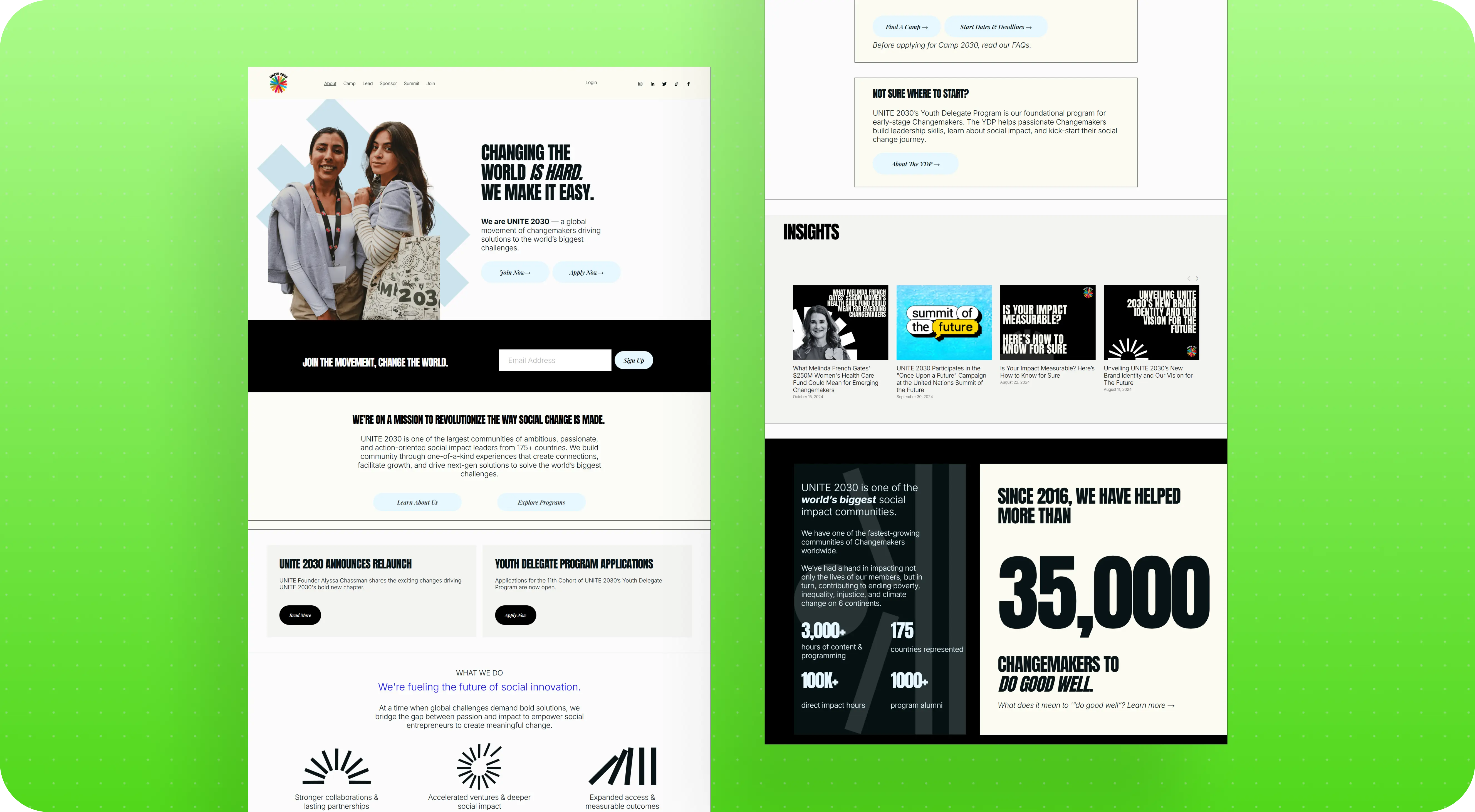
The employer came to us with a clear vision
Unlike many discovery projects, Unite did not start with a vague brief. The employer had already defined the website structure and prepared detailed content. Every page had a clear purpose, every section had a reason to exist, and even during the estimation phase it was obvious that the website would include both static pages, such as the Homepage and About Us, and dynamic program pages where each hackathon or program would have its own landing page.
As we dug deeper, however, it became clear that the website itself was not the most challenging part of the project.
The real complexity began after someone clicked Apply.
From the very beginning, we focused on understanding not only what each page was supposed to accomplish, but also what happened to an application once it entered the employer's internal workflow. That understanding became the foundation for every design and technical decision that followed.
Starting with the workflow, not the interface
Clicking Apply looked simple.
Behind that button was an entire operational workflow involving multiple services, manual reviews, different business rules for different programs, and a team that carried most of the process logic in their heads. Designing a participant dashboard before understanding that workflow would have made little sense. The interface would simply have become a polished layer on top of a process that was never fully documented.
Instead, we started by learning how everything actually worked. We reviewed walkthrough videos recorded by the employer, analyzed the Airtable structure, mapped different scenarios during working sessions, and documented every question that came up along the way. Which documents were mandatory? Which could be submitted later? Which requirements depended on the participant's country? Which varied by program? Who reviewed each application? What happened when information was missing or incomplete?
What the employer got: a clearly documented workflow broken down by scenarios, user roles, and business rules. It became a solid foundation that both the design and development teams could build on.
Inside the application workflow
Unite programs were offered both online and in person, with most in person events taking place in the United States. Applications, however, came from all over the world, including India, Iran, China, and dozens of other countries. Many participants required U.S. visas, which added another layer of operational complexity. The team also had to help accepted participants arrange visas, travel, and accommodations.
The application workflow looked like this.
A participant completed a third party application form embedded on a program page. Their information was then sent to Airtable, where a manager manually reviewed submissions and filtered out applicants who did not meet the requirements for a specific program.
Once the manual review was complete, the application received a tag. Zapier used that tag to trigger the next step, while Mailchimp automatically sent an email letting the participant know whether they had been accepted. The payment stage came next, followed by another round of emails. Finally, participants were invited to Circle.io, where they could access learning materials, watch videos, and communicate with the community.
A single application passed through multiple independent services that were not connected by a shared workflow. Instead, the entire process relied on a series of manual and semi automated handoffs between disconnected tools.
What the employer got: a complete map of every step an application went through, from the website form to Airtable, Zapier, Mailchimp, and Circle.io, along with a clear picture of exactly where the team was spending time on manual work. Previously, that workflow existed only in managers' heads. Now it was documented as a single process that everyone could rely on.
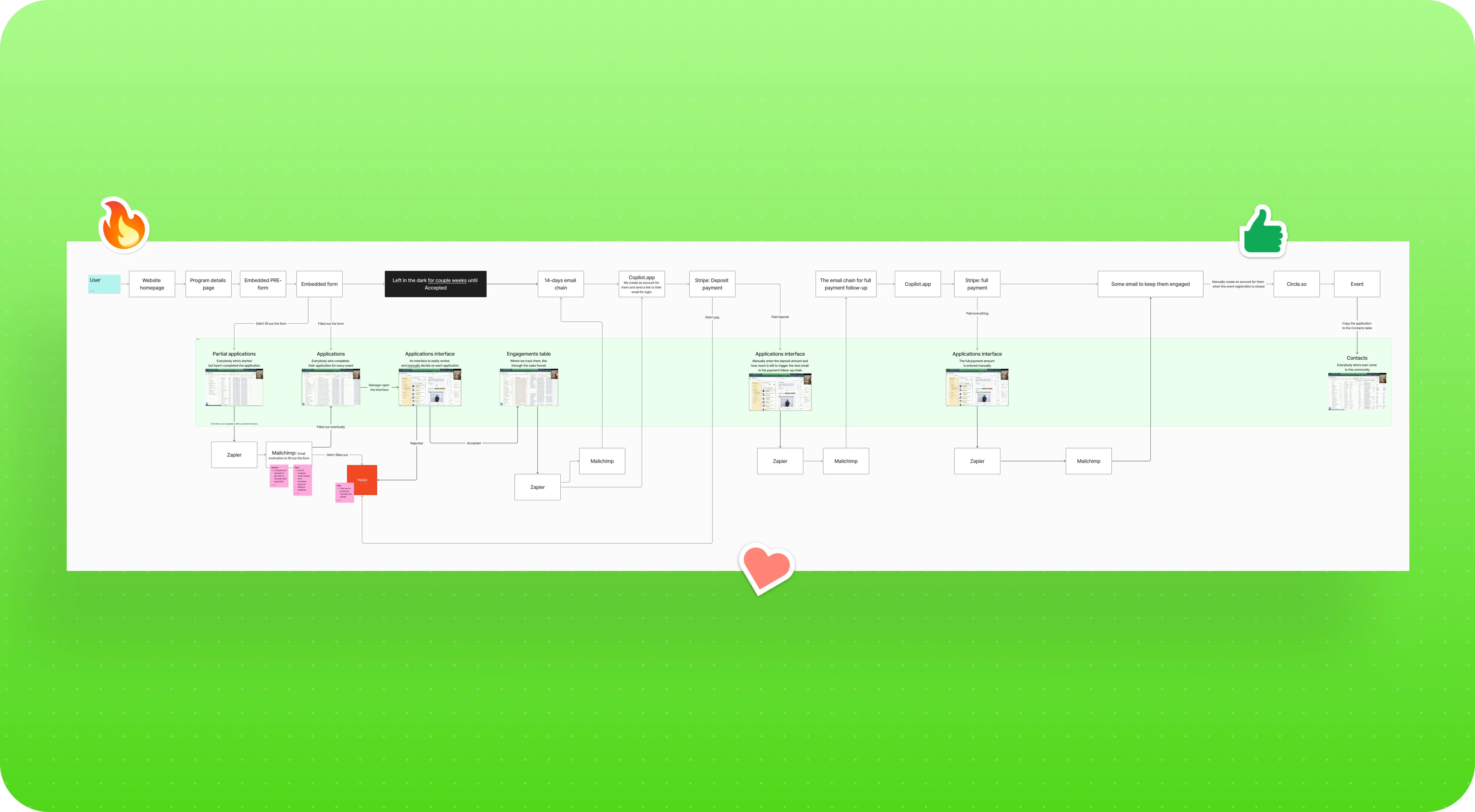
One hub instead of fifteen disconnected tools
After mapping the entire workflow, we proposed a different approach.
Instead of moving application data through a chain of disconnected services, we suggested introducing a central microservice that would become the single source of truth. Applications submitted through the website or individual program pages would first enter this central service. From there, the data would be automatically distributed to Airtable, Mailchimp, and Circle.io.
The goal was not to replace the tools the employer already relied on. The team would continue working in Airtable, which had become their primary operational workspace over the years. The goal was to eliminate the fragmented chain of disconnected services and replace it with a single orchestration layer that connected everything together and automated work that had previously depended on manual intervention.
The idea resonated with the employer from the very first meeting. They asked us to walk through the workflow in greater detail so we could refine the solution together and make sure it reflected how their team actually worked.
What the employer got: a solution that immediately addressed the biggest architectural challenge without requiring the team to abandon Airtable. The concept was approved during the first meeting, allowing us to move straight into collaborative solution design with the Unite team.
From a concept to a working architecture
As we revisited the workflow in greater detail, we realized the actual system was far more complex than it had seemed during the first discovery session. There were more transitions, more decision points, and more places where an application could branch into different paths. We mapped the entire lifecycle, starting with the moment an application was submitted and ending when a participant reached the final acceptance list.
From the beginning, we separated the solution into two states. The first was what the product needed to launch successfully. We called this Point A. It represented the MVP, where the core functionality was in place, even if some parts still relied on practical compromises. The second was Point B, the complete long term vision of the platform.
Our process always started with Point B. We presented the complete vision to the employer, collected feedback, and then identified which of those ideas could realistically be incorporated into Point A. That approach ensured the MVP would support the product's long term direction instead of becoming something that would later need to be rebuilt.
By the second workshop, we had also refined the website architecture itself. We defined user flows for each audience, including Changemakers, investors, and donors. We structured the homepage and designed a searchable directory of every Changemaker who had participated in the program, allowing visitors to open an individual profile and explore the initiative each person had worked on.
What the employer got: a production ready architecture that development could begin implementing immediately. It included complete user flows for Changemakers, investors, and donors, a structured homepage, a directory covering every participant in the organization's history, and a clear separation between the MVP and the full product vision.
Automation without disrupting ten years of history
The project came with a substantial amount of historical data stored in Airtable, some of it dating back to 2015. Preserving that data quickly became one of the project's biggest constraints.
As a social impact initiative, Unite regularly relied on historical program data when organizations such as the United Nations wanted to understand where successful Changemakers were coming from. That meant deleting or fundamentally restructuring historical records was never an option. We had to improve the workflow while leaving years of accumulated data intact.
The operational challenge itself was significant. A single event could include as many as eight different application statuses, while the underlying information was spread across multiple related Airtable tables. Our goal was to present all of that complexity in a way that made sense to both participants and managers, without requiring either of them to understand Airtable's internal structure.
What we automated
We streamlined and partially automated the infrastructure the employer had built over the years. Some checks that managers previously performed manually, such as filtering out applicants who did not meet a program's eligibility requirements, became automated before an application ever reached human review.
Participants did not need to see every internal status change. Instead, they received notifications only when something meaningful happened, giving them clear visibility into their application without requiring them to contact support for updates.
We also reduced the team's reliance on several third party services. Payment links and other supporting resources that managers previously sent by hand were generated automatically. Because the workflow involved numerous connected tables and a large number of business exceptions, this part of the project required especially thorough testing. Every automation had to preserve existing data while ensuring that no application status could be updated incorrectly.
What the employer got: the same Airtable workspace their team already knew, but with significantly less manual work, automated participant status updates, and no risk to nearly a decade of historical data.
What's included
Set a goal and we will organize the process of achieving it

Other templates
We always try to be active members of the design community
and help it develop with the help of our design




.jpeg)


%2520(1).jpeg)


.jpeg)